
AI
Pricing: $8/mo.
Start for free.
About Image to 3D AI
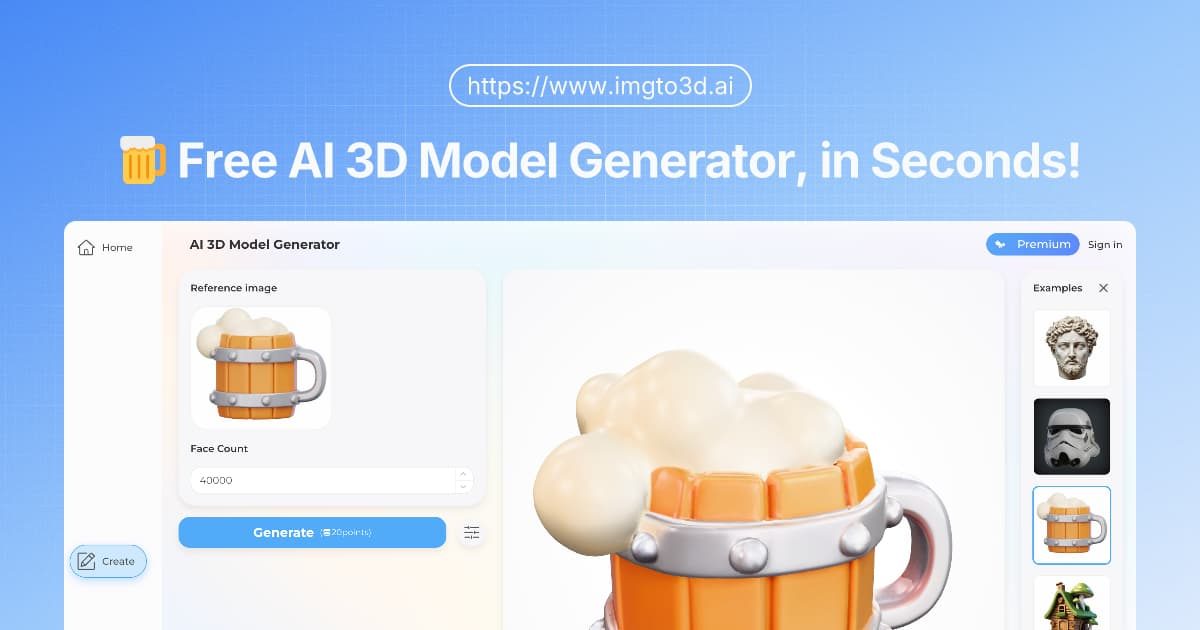
For many creators, the biggest bottleneck in design is the transition from a 2D concept to a 3D asset. ImgTo3D.ai tackles this problem head-on. It acts as a bridge between your imagination and spatial reality. Instead of spending hours sculpting vertices in complex software like Blender or Maya, users can simply upload a single image—be it a character sketch, a logo, or a product photo—and let the image to 3d AI engine handle the heavy lifting. It’s not just about extrusion; the AI interprets depth and volume to create a usable 3D mesh automatically.
🚀 Key Features
💡 Use Cases
We found this tool particularly useful for specific creative scenarios:
📝 Our Verdict
ImgTo3D.ai is a robust solution for the “blank canvas” problem in 3D design. While it won’t replace a senior character artist for hero assets, it is an incredible productivity booster for everything else. If you are looking to dip your toes into 3D creation or need to prototype fast, this image to 3d model tool is a must-try.
Frequently Asked Questions
Yes, ImgTo3D.ai offers a free trial for new users to experience the capabilities of creating 3D models from images. For users requiring advanced features, higher resolution downloads, and priority processing, the platform provides flexible subscription plans tailored to different needs.
Absolutely. Users subscribed to the paid plans have full commercial rights to the 3D assets they generate. These models can be used in commercial games, 3D printing businesses, architectural visualizations, or any other professional creative work.
The platform supports industry-standard formats to ensure compatibility with most 3D software. Models can be downloaded in .GLB, .OBJ, and .STL formats, making them ready for immediate use in tools like Blender, Unity, Unreal Engine, or 3D slicers.
For the highest quality 3D models, it is recommended to use images with high resolution, clear lighting, and a distinct subject. Images with a clean or simple background tend to process better than cluttered ones. Symmetrical objects and clear character designs also work exceptionally well with the AI engine.
Speed is a key feature of the tool. Most standard 3D models are generated in just a few seconds to a couple of minutes, depending on the complexity of the image and server load. This is significantly faster than the traditional manual modeling process.
Not at all. ImgTo3D.ai is designed to be accessible to everyone. Users do not need to know how to sculpt or use complex software like Maya or ZBrush. They simply upload an image, and the AI handles the technical work automatically.
Low-effort reviews like “Great app, I love it” or “I didn’t like it” aren’t very helpful for users or app creators. Please tell us more about your experience.
Ratings
Great0%
Good0%
Decent0%
Bad0%
Terrible0%
Pricing: $20/mo.
Start for free.

Pricing: Varies. See pricing page.
There are no similar tools
ResetThis site is protected by reCAPTCHA. Google Privacy Policy and Terms of Service apply.